KKlarora

One workspace for your entire team. Tasks, docs, chat, and AI — all connected.

Product

  • Features
  • Pricing
  • API
  • Docs
  • Compare
  • Changelog

Solutions

  • Engineering Teams
  • Enterprise
  • Startups
  • Agencies
  • All Use Cases

Company

  • About Us
  • Careers
  • Blog
  • FAQ
  • Support
  • Contact
  • Status ↗

Legal

  • Privacy Policy
  • Google User Data
  • Terms of Service
  • Security
  • Trust ↗
  • Subprocessors
  • DPA
  • Cookie policy
© 2026 Kairos Connect B.V. All rights reserved.
KKlarora
Products
Core features
FoFeatures overviewSee every module at a glancePrTasks and projectsBoard, calendar, Gantt, sprintsGoGoals and OKRsKey results, check-ins, stakeholdersChTeam chat and mailEnd-to-end encrypted, with a connected mailboxDoDocs and databasesBlock editor, 17 property types, six viewsWbWhiteboardsPrompt-to-diagram, real-time canvasFmFormsBuilder, templates, records that trigger flowsCrCRMPeople, companies, pipeline, outreach inbox
AI and add-ons
AiAssistantSkills, memory, bounds, undoAgAgents and automationsDescribe a flow, approve the work · UltimateDrDeep ResearchPlan → Research → Write → Polish · add-onFiFinanceInvoicing, ledger, bank reconciliation · add-onReRecruitmentSourcing, screening, shortlists, ATS · add-on
View all products
Platform
iOMobile appsiOS and AndroidDkDesktop appsmacOS, Windows, Linux
Solutions
StFor startupsScale fast without the tool taxSbFor small businessGrow without chaosEnFor enterpriseSecurity meets simplicityRtFor remote teamsStay aligned across time zonesEgFor engineering teamsSpecs, sprints and an autofix loopAgFor agenciesA workspace per client, hours into invoicesRaRecruitment agenciesAI that screens candidates for youView all solutions
Pricing
Compare
vs ClickUpvs Linearvs Asanavs monday.comvs Jiravs Slackvs Notion
Blog
Book a demoLog in
Start free

Platform · Desktop apps · macOS, Windows, Linux

A native app that stays out of the way.

Signed and notarized builds for macOS (Apple Silicon and Intel), Windows 64-bit, and Linux as AppImage or Deb. Native notifications and tray, a focus mode, local caching so the app opens before the network does, and updates that install themselves.
Download for macOS Windows and Linux buildsBuilt with Tauri · signed macOS builds since May 29
Klarora — Northwind Product
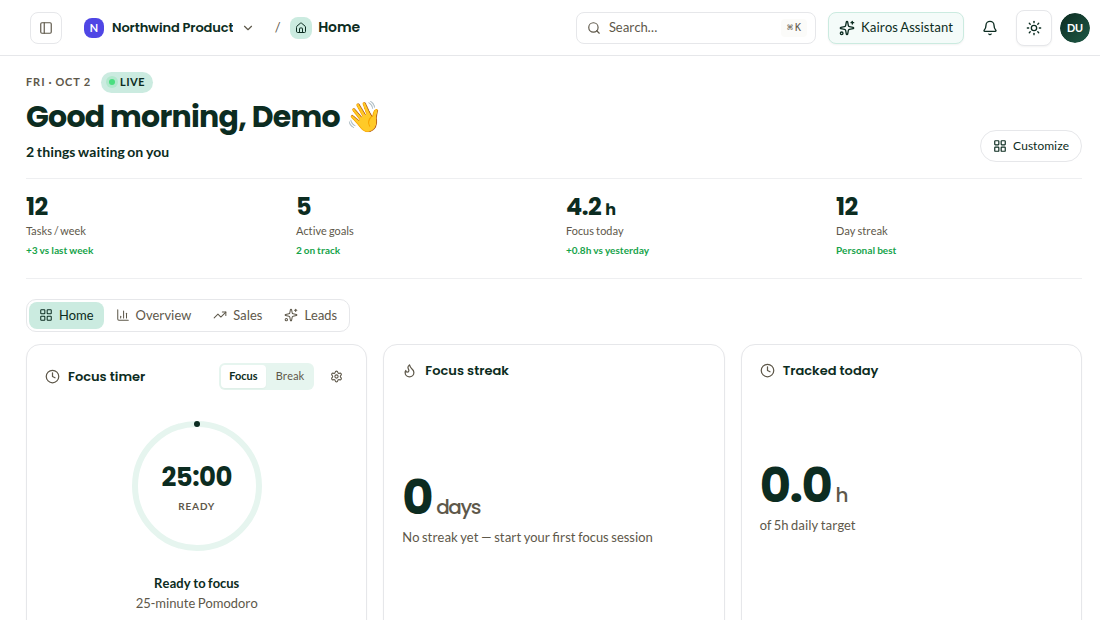
The workspace home in the desktop app
Update readyDownloaded in the background. Applied on the next launch.
Native notificationRequests · 1 newInvoice chaser asks: one combined reminder or two?

What the desktop app adds.

Native notificationsRequests, mentions and approvals arrive as system notifications with actions, and the tray shows what is waiting.
Focus modeA timer with the task you picked, notifications held, and a streak you can see on the home screen.
Local cachingRecent pages, tasks and chats open instantly and work offline; changes sync when you are back.
Keyboard-firstA command palette and shortcuts for every module; the same ones as the web app.
Background updatesThe app checks for updates in the background; macOS and Windows apply them on the next launch.
Same workspaceNo feature difference with the web app. Install on as many devices as you like.
macOSSigned and notarized. Universal updater.Apple Silicon · .dmgIntel · .dmg
Windows64-bit installer with background updates.Windows 64-bit
LinuxAppImage and Deb packages.AppImageDebian / Ubuntu · .deb

Questions

Is the app signed and notarized?+

Yes. macOS builds are signed and notarized with Apple; Windows builds are code-signed.

Does the desktop app update automatically?+

It checks in the background. On macOS and Windows the update is applied on the next launch; on Linux the AppImage prompts you.

Is there a feature difference between web and desktop?+

No. Desktop adds native notifications, the tray, focus mode and local caching.

Open the workspace before the network does.

Install the desktop app and keep the web app for everything else.

Download for macOSAll downloads