
Picture a finance lead at a 120-person company, a generic example. The same kind of message arrives most weeks. The operations director wants to know what was spent on contractors this year. A project lead asks whether travel costs are up against last year. Sales wants the revenue per quarter for a board slide. Each question is small. Each one turns into a Twinfield login, a report, an export to Excel and twenty minutes of tidying before anyone sees a number.
On 20 November 2026 we shipped a change in Klarora by Kairos aimed at exactly these requests. You can connect your own Twinfield account and ask Kairos, the assistant in Klarora, about your books in plain language.
In short: Klarora can now read a connected Twinfield administration and answer finance questions in chat with annual totals, ledger reports that include built-in checks, or a bar chart. You can open the answer as a card, export it to Excel, PDF or PNG, and pin it to your Home page. Your books stay in Twinfield; the bookkeeping, the VAT return and the year-end work stay where they are today.
What is Twinfield reporting, and why does it take so long?
Twinfield is the cloud accounting package from Wolters Kluwer, widely used in the Netherlands by companies and by the accounting firms that keep their books. Its reporting is solid for what it is meant to do. Wolters Kluwer's Twinfield reporting guides describe more than 50 standard reports, custom reports built from those, a reporting structure that groups general ledger accounts, and exports to PDF, CSV and Excel.
The slow part is rarely the report itself. It is the route the question takes:
- The person asking usually has no Twinfield login, or has one with more access than they should.
- In many companies the administration is kept by the external accountant, so a report change goes through the firm. Finstack's 2026 overview of Twinfield reporting describes this division of roles as common.
- The standard report follows the chart of accounts. The question ("contractors", "travel", "per quarter") often does not, so someone rebuilds the answer in a spreadsheet.
None of this is a fault in Twinfield. It is the cost of having the numbers in one system and the people asking questions in another.
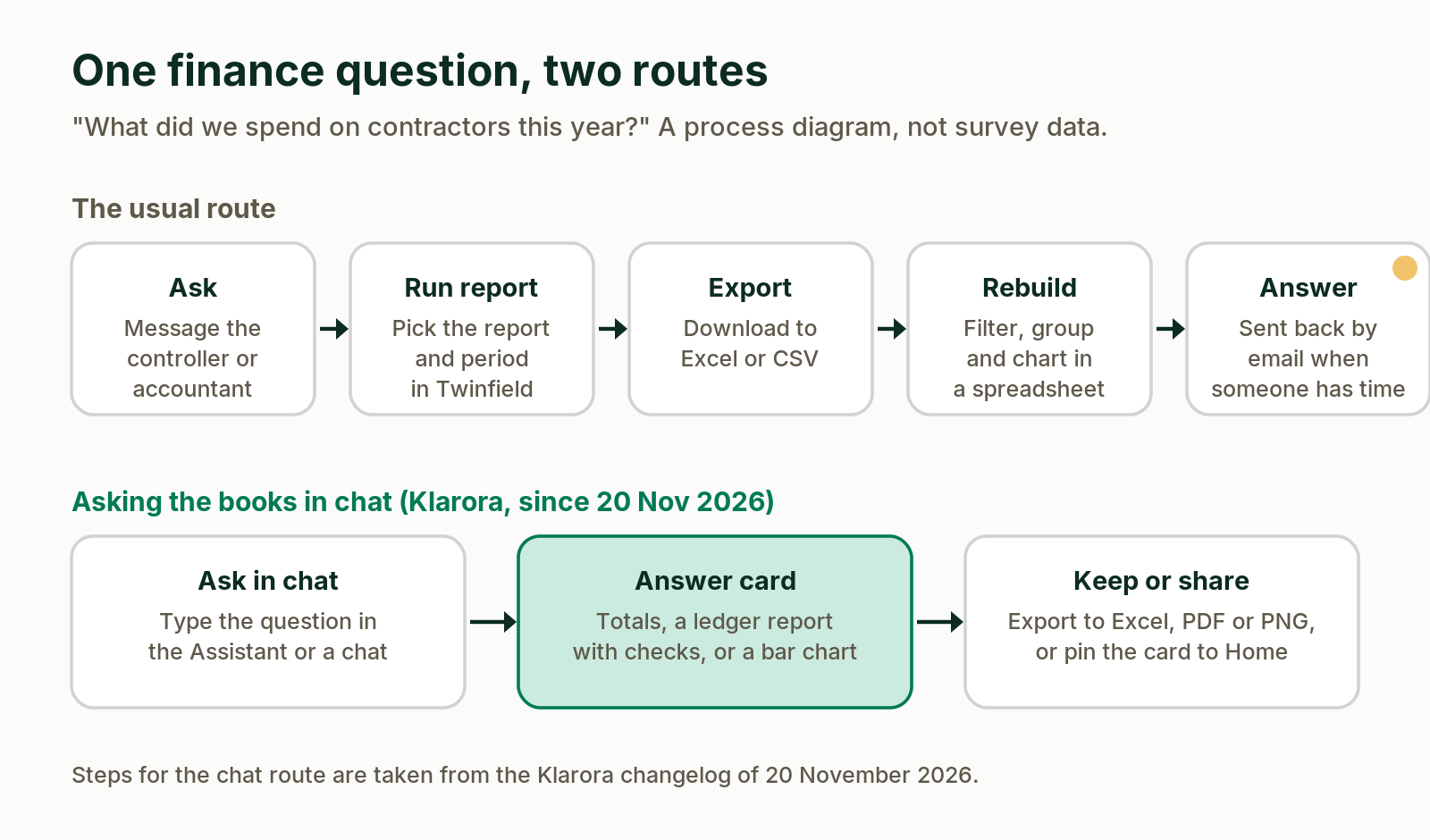
A process diagram, not survey data. The chat route follows the Klarora changelog of 20 November 2026.
How common is this problem for Dutch SMEs?
Common enough to show up in survey data. In the Exact MKB Barometer 2026, a survey of 1,719 Dutch SME owners and managers in companies with 2 to 250 employees, 24% named "better and more current insight into our financial figures" as a main challenge in their financial administration. 28% named reducing the administrative burden. Only getting customers to pay on time scored higher, at 30%.
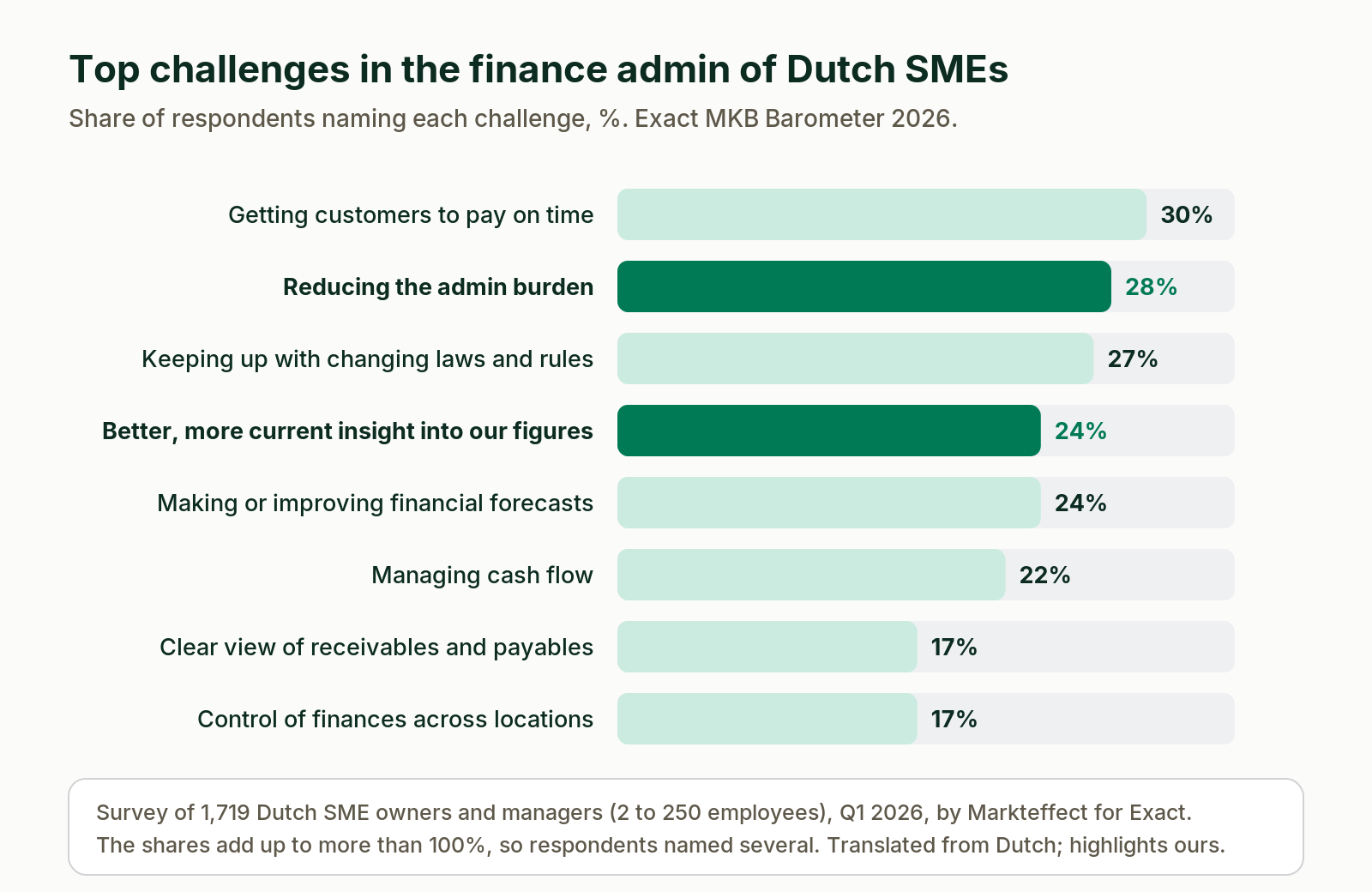
Source: Exact MKB Barometer 2026, fieldwork by Markteffect in Q1 2026. Respondents could name several challenges. Exact sells accounting software, so read it as a vendor survey.
The survey does not ask about Twinfield specifically. It does say that the people running Dutch SMEs want current numbers with less admin, and the slow route above is where much of that admin sits.
What shipped in Klarora on 20 November?
From the Week 47 changelog, the Twinfield part is short:
- Connect your own Twinfield account. Your books stay in Twinfield.
- Ask in the Assistant or in chat. You can ask Kairos in the Assistant panel or in a team chat, where the answer is visible to everyone in the thread.
- Three kinds of answer: annual totals, ledger reports with built-in checks, or a bar chart.
- Finance cards you can keep. Expand any finance card, export it to Excel, PDF or PNG, and pin it to your Home page.
A question that used to start with "can you send me" becomes something like "show total spend on ledger account 4600 for 2025 and 2026 as a bar chart", and the person who asked sees the answer where they asked it.
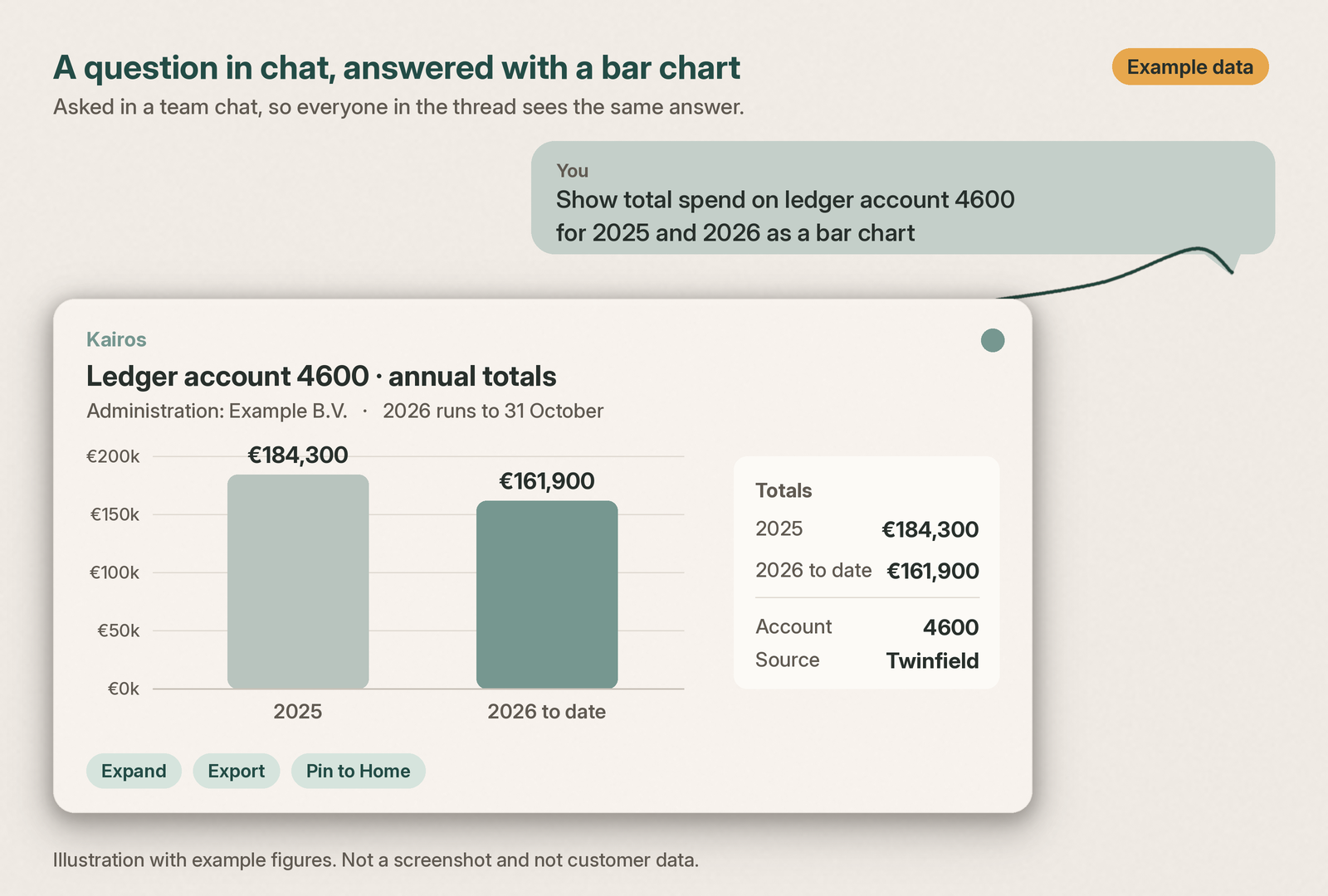
Illustration with example figures, not customer data: the question above, asked in a team chat and answered as a bar chart card.
Which Twinfield questions suit chat, and which do not?
Chat works best for questions with a clear period, a clear account or group of accounts, and an answer someone will read rather than file. Formal output belongs in Twinfield and with your accountant. This is how we would split it.
| Question | Good fit for chat? | Why |
|---|---|---|
| Total on one ledger account for this year and last year | Yes | One period, one account, an annual total |
| Spend on a group of accounts (for example all travel accounts) | Yes, if you name the accounts | Saves the spreadsheet step; name the accounts so the grouping is explicit |
| A ledger report for one account, to see the lines behind a total | Yes | The ledger report includes built-in checks |
| A chart of revenue per year for a board slide | Yes | Ask for a bar chart, export as PNG |
| The VAT return | No | Prepare and file it from your accounting package, with your accountant |
| Year-end figures for the annual accounts | No | These follow your accountant's adjustments and sign-off |
| Anything you would book or correct | No | Corrections belong in Twinfield, made by whoever keeps the books |
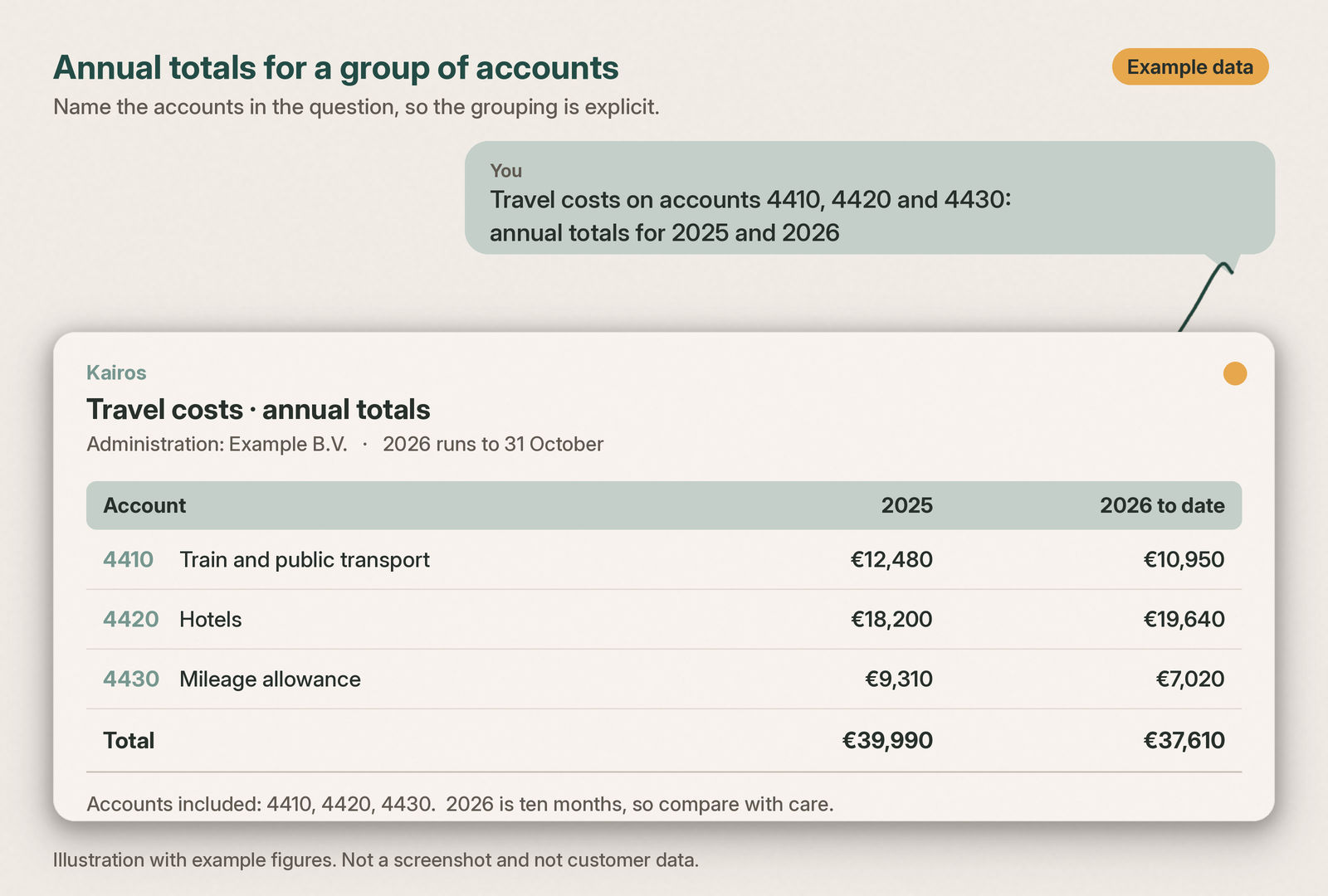
Illustration with example figures. Naming the accounts in the question makes the grouping explicit and easy to check.
How do you check an answer before you share it?
Check the first answers the way you would check a report from a new colleague. Five checks cover the usual mistakes.
- Period. Confirm the answer covers the period you meant: calendar year or financial year, and to which month.
- Accounts. Read which ledger accounts were included. If you asked for "travel", check that every travel account is in and nothing else is.
- Administration. If your group has more than one company in Twinfield, confirm which administration the answer came from.
- Provisional entries. Twinfield separates provisional and final transactions, and Wolters Kluwer's guides tell users to check provisional ones before final approval. Ask whether provisional entries are included, and say which you want.
- Tie-out. For anything going to the board, a bank or an investor, compare the total once with the trial balance in Twinfield. If it matches, keep the exported PDF with the pack.
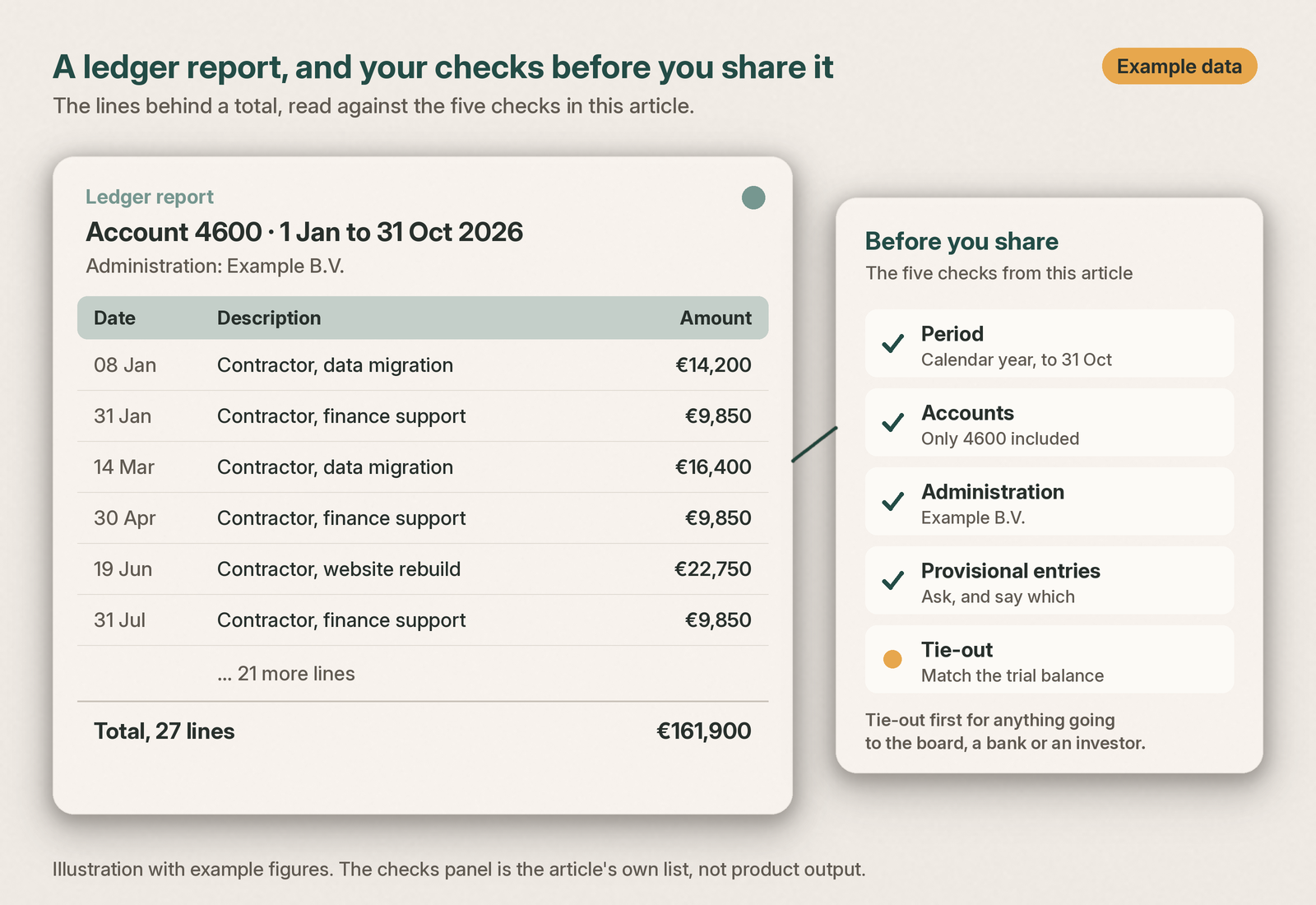
Illustration with example figures. The right-hand panel is the five checks above, not something the product runs for you.
For the first month, have the person who keeps the books spot-check a handful of chat answers. After that, check what leaves the company.
How should you set up the Twinfield connection?
Three decisions are worth making before anyone connects anything.
Whose access? The changelog says you connect your own Twinfield account. Use an account with the access you actually want answered in chat. If the books are kept by your accountant, agree with the firm which user is connected, and tell them why.
Where do answers go? Answers in a team chat are visible to everyone in that chat. For salary-heavy accounts or anything sensitive, ask in the Assistant panel or a private chat instead.
What gets pinned? Pick three or four numbers the management team asks for every month, such as revenue year to date or spend on contractors, and pin those cards to Home. A Home page with twenty cards stops being read.
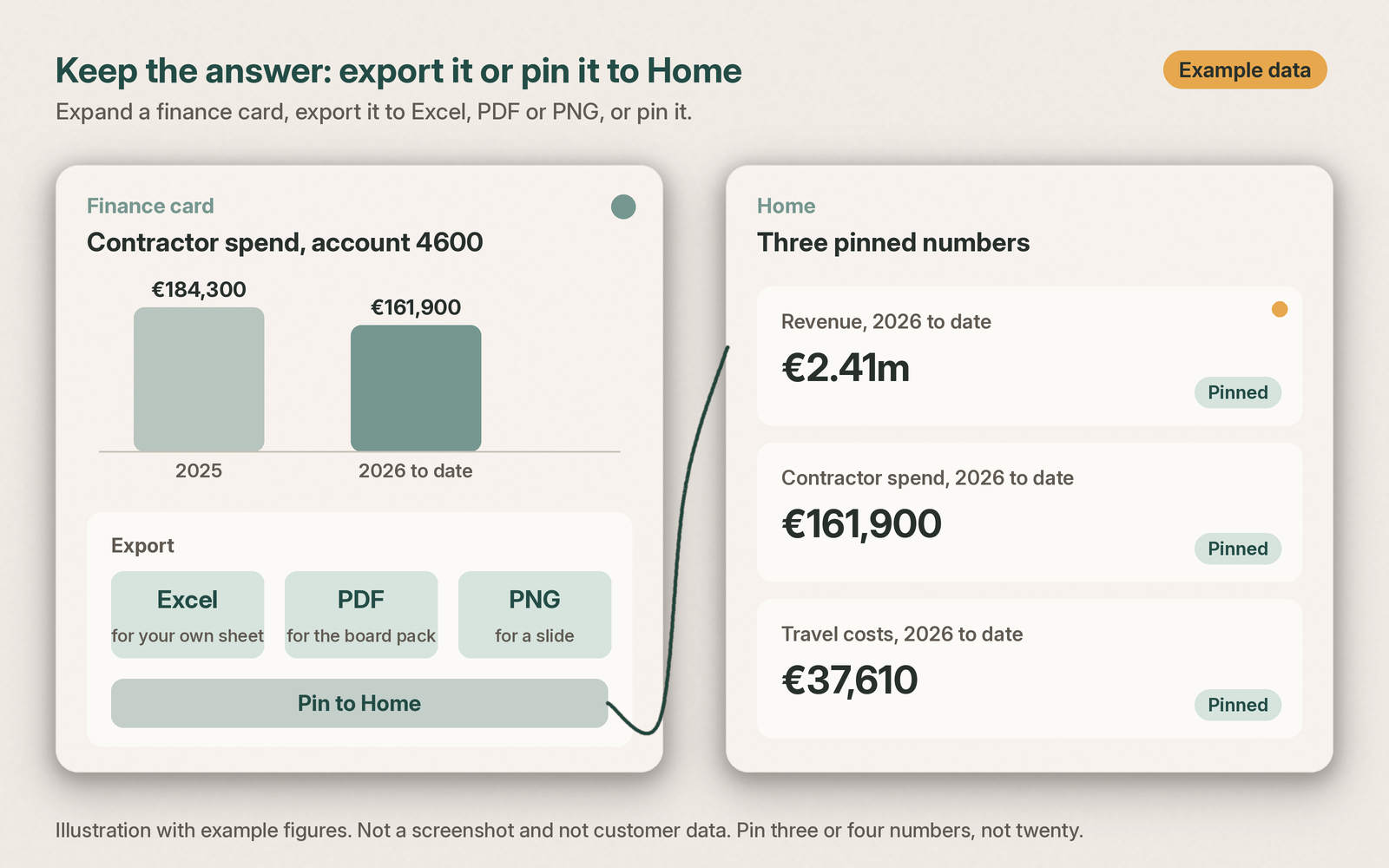
Illustration with example figures. One card exported or pinned, and a Home page kept to three numbers.
Where Klarora fits, and where it does not
Klarora by Kairos is an all-in-one workspace: tasks, docs, chat, CRM and an assistant on every plan, with Finance as an add-on for invoicing, bills, bank reconciliation and period close. The Twinfield connection is for companies that keep their books in Twinfield and want to keep them there, while operations and management ask their finance questions in the same place they plan the work.
If your company already moved its ledger into Klarora Finance, you will not need it. If you are happy with Twinfield and your accountant, nothing about this change asks you to move. For a fair look at the trade-offs between an accounting-first package and a workspace, read our comparison of Exact Online and Klarora. The same reasoning applies to Twinfield.
Quick answers do not replace the routine work behind them. Our month-end close checklist and the guide to weekly bank reconciliation cover that part.
Frequently asked questions
Do I need to move my books out of Twinfield?
No. You connect your own Twinfield account and ask questions about the books in it. Twinfield stays your accounting system, and your accountant keeps working there as before.
Can Klarora file my VAT return from Twinfield data?
No. The feature answers questions with totals, ledger reports and charts. Prepare and file the VAT return from your accounting package with your accountant, as you do today. Our monthly VAT checklist covers the checks before you file.
What formats can I export an answer to?
Excel, PDF or PNG. You can also pin the finance card to your Home page so it stays in view.
Is Twinfield reporting in chat accurate enough for the board?
Use it for the number, then tie the total once to the trial balance in Twinfield before it goes into a board pack. Check the period, the accounts and whether provisional entries are included.
Where can I see what else changed in Week 47?
On the Klarora changelog. The same release added quotes and invoices from any CRM customer, forms that people outside your workspace can fill in, My Calendar, and a timer that stays in sync between browser and desktop.
Klarora is made by Kairos Connect B.V. in Amsterdam and hosted in the EU.