KKlarora

One workspace for your entire team. Tasks, docs, chat, and AI — all connected.

Product

  • Features
  • Pricing
  • API
  • Docs
  • Compare
  • Changelog

Solutions

  • Engineering Teams
  • Enterprise
  • Startups
  • Agencies
  • All Use Cases

Company

  • About Us
  • Careers
  • Blog
  • FAQ
  • Support
  • Contact
  • Status ↗

Legal

  • Privacy Policy
  • Google User Data
  • Terms of Service
  • Security
  • Trust ↗
  • Subprocessors
  • DPA
  • Cookie policy
© 2026 Kairos Connect B.V. All rights reserved.
KKlarora
Products
Core features
FoFeatures overviewSee every module at a glancePrTasks and projectsBoard, calendar, Gantt, sprintsGoGoals and OKRsKey results, check-ins, stakeholdersChTeam chat and mailEnd-to-end encrypted, with a connected mailboxDoDocs and databasesBlock editor, 17 property types, six viewsWbWhiteboardsPrompt-to-diagram, real-time canvasFmFormsBuilder, templates, records that trigger flowsCrCRMPeople, companies, pipeline, outreach inbox
AI and add-ons
AiAssistantSkills, memory, bounds, undoAgAgents and automationsDescribe a flow, approve the work · UltimateDrDeep ResearchPlan → Research → Write → Polish · add-onFiFinanceInvoicing, ledger, bank reconciliation · add-onSuSupplyPurchase orders, receipts and stock counts · add-onReRecruitmentSourcing, screening, shortlists, ATS · add-on
View all products
Platform
iOMobile appsiOS and AndroidDkDesktop appsmacOS, Windows, Linux
Solutions
StFor startupsScale fast without the tool taxSbFor small businessGrow without chaosEnFor enterpriseSecurity meets simplicityRtFor remote teamsStay aligned across time zonesEgFor engineering teamsSpecs, sprints and an autofix loopAgFor agenciesA workspace per client, hours into invoicesRaRecruitment agenciesAI that screens candidates for youView all solutions
Pricing
Compare
vs ClickUpvs Linearvs Asanavs monday.comvs Jiravs Slackvs Notion
Blog
Book a demoLog in
Start free

Klarora Supply

Know your stock, down to the last metre.

Inventory management and purchasing for teams that buy, store and use physical goods. Follow each item from supplier order to warehouse shelf, with its quantity, location and cost in one workspace.

Explore the dashboard ↓Talk to sales
Forest green canvas rolls, brass buckles and labelled cartons
Forest canvas CV-FOR-25 · 25 metres / roll
DashboardWorkflowFeaturesCostingPricingFAQ

Inside the dashboard

From shelf count to supplier cost.

Explore three Supply screens with sample records. See what the warehouse checks on arrival and what finance reviews when the freight bill comes in.
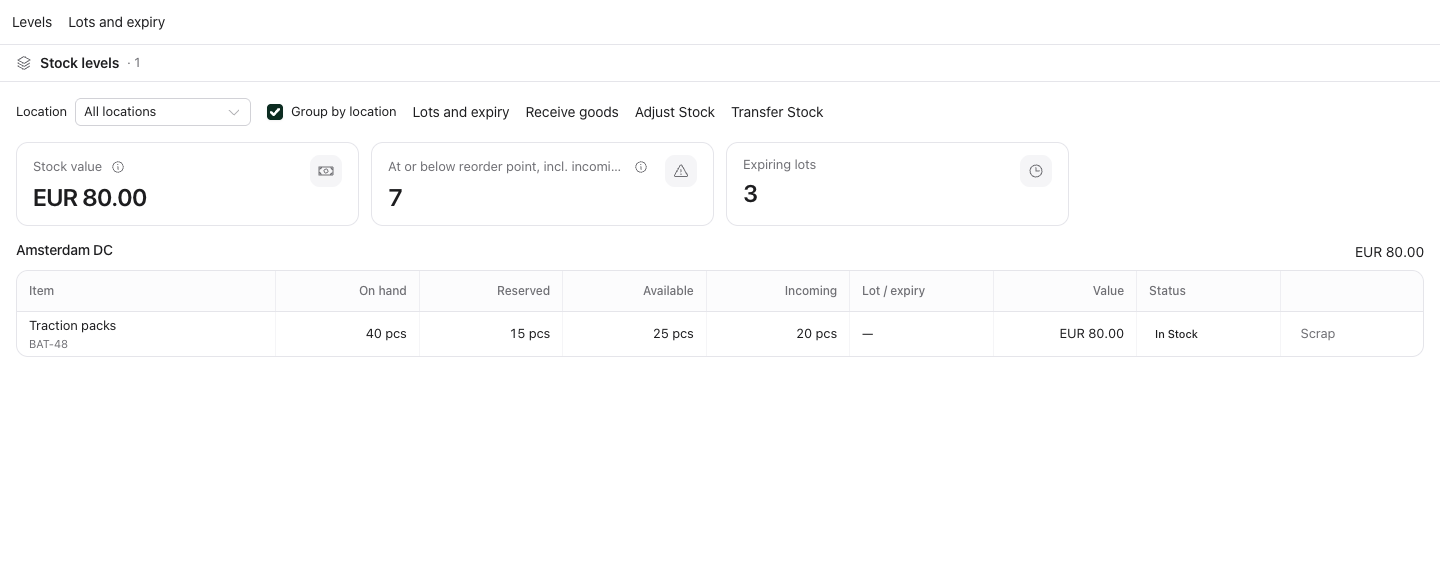
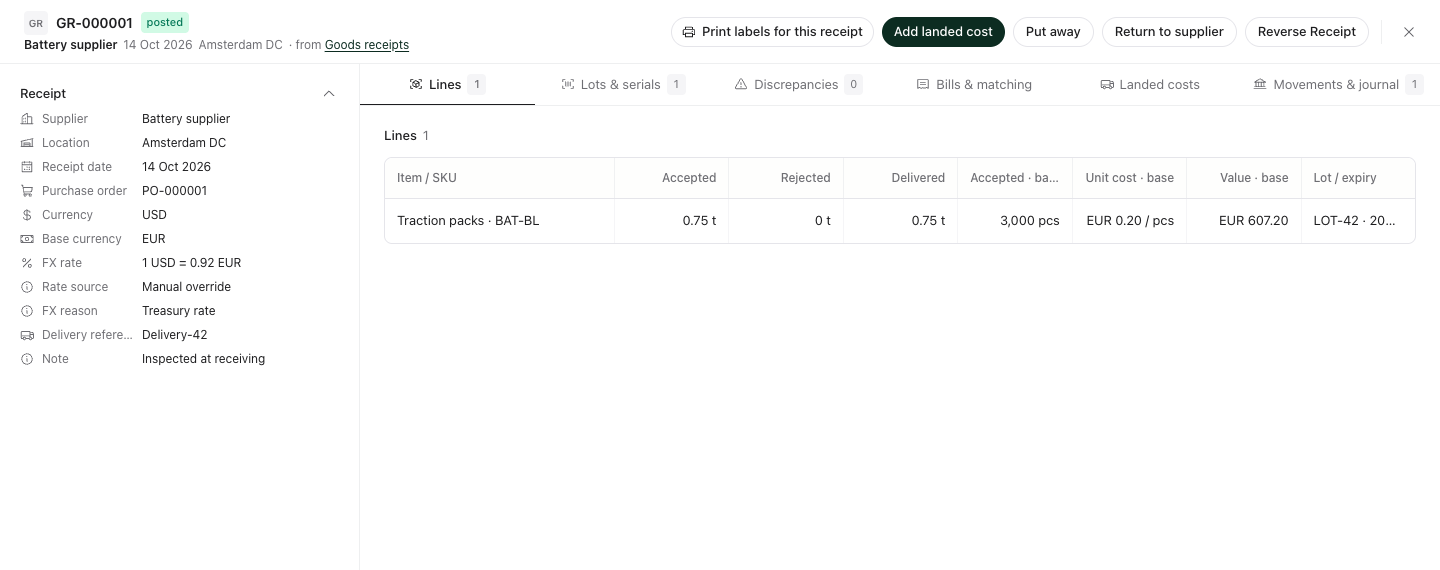
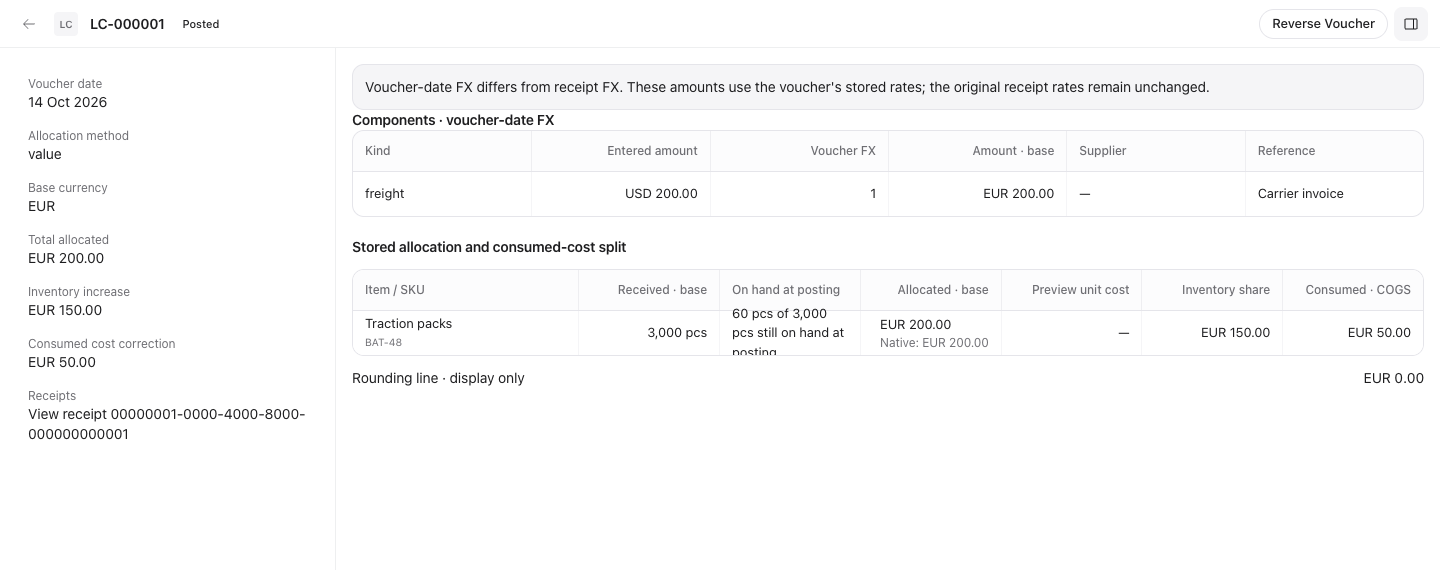
Supply stock levels grouped by location, showing on-hand, reserved and available quantities for traction packsPosted goods receipt with supplier, order reference, lot, accepted quantity and cost columnsLanded-cost voucher with freight allocation, inventory increase and consumed cost correction
See what is free to use.

In the Amsterdam warehouse, 40 pieces are on hand. With 15 reserved, the stock view shows 25 available.

View full size ↗

Interactive example

One item. Three views of the same delivery.

Follow a roll of canvas through buying, receiving and stock control. Try a partial delivery and see which quantities change.

Order in the supplier’s units.

The buyer orders twelve 25-metre rolls of forest canvas. The item record ties the supplier’s pack size to the unit the warehouse counts.

Purchase orderPO-1042
Forest canvas

CV-FOR-25

Supplier unit
Roll of 25 m
Quantity ordered
12 rolls
Expected stock
300 m

Tools for the buyer, the warehouse and the books.

Items, variants and units of measure

Give each colour and pack size its own identity. Buy canvas by the roll and count it by the metre with unit conversions.

Barcode labels and scanning

Print labels for items, lots and locations. Scan a barcode while receiving goods to pick the right item on the warehouse floor.

Stock movements and counts

See stock by location, transfer it between shelves and post the difference after a physical count. Each movement leaves a record.

Purchase orders and requisitions

Review requests before ordering. Receive a supplier order in parts and keep the outstanding quantity visible for the next delivery.

Inventory and supplier reports

Find stock that has stopped moving, compare turnover and inspect supplier scorecards before placing the next order.

Landed cost and three-way match

Allocate freight and duties to the units received. Compare the purchase order, goods receipt and supplier bill before payment.

Inventory valuation

What did the stock on this shelf cost?

Two rolls can look identical and cost different amounts. Set a costing method for your team and choose a different one for an item when you need it.

Finance sync is optional. Connect Klarora Finance when your accounting team needs the stock entries.

FIFO
Issue the oldest costs first, even when successive deliveries have different prices.
Moving average
Recalculate the average unit cost as new stock arrives.
Standard cost
Value each unit at a fixed cost that your team sets and reviews.
Specific identification
Keep the exact cost attached to an individual unit.

Ultimate add-on

Bring Supply to your team.

Add inventory, purchasing and costing to the workspace your team already uses.

€119 per seat per month
  • Priced per seat, so the cost follows the seats you add.
  • There are no per-order fees.
  • Remove Supply any time. The unused part of the billing period is credited.
Talk to salesCompare plans

Supply questions, answered.

How much does Supply cost?

Supply is an add-on to the Ultimate plan: €119 per seat per month. There are no per-order fees.

Which costing methods does Supply support?

FIFO, moving average, standard cost and specific identification.

Does Supply support LIFO costing?

No. IFRS does not allow LIFO, so Supply does not offer it as a costing method.

What is three-way match?

It checks the purchase order, the receipt and the supplier bill against each other before you pay.

What is landed cost?

Freight, duty and other costs of getting goods to you, spread across the items that arrived so stock carries its true cost.

Do I need Klarora Finance to use Supply?

No. Finance sync is optional, and Supply works on its own.

Can I remove Supply?

Yes, any time. The unused part of the billing period is credited.

Costing for the EU and Southeast Asia

Supply has no LIFO costing, because IFRS does not allow it. That suits businesses in the EU and Southeast Asia, where inventory is reported under IFRS or standards converged with it.